Why Group Address Naming Decides Your Project’s Future
There is a moment in every KNX project’s life when someone needs to change something. A new sensor is added. A room is repurposed. A gateway is installed. In that moment, the project either moves forward smoothly or grinds to a halt.
What determines the outcome is rarely the hardware. It is almost always the Group Address structure — and specifically, whether anyone can understand it.
In many projects, Group Addresses are set randomly or based on physical layout. While that might work at the beginning, it becomes confusing during maintenance or when handing over the project to another integrator. I have seen a five-year-old installation where every Group Address was named “1/2/3” with no documentation. When the client wanted to add a single sensor, the technical team spent two days tracing which address controlled which device.
This guide is the documentation that prevents those two days.
The Three-Level Structure
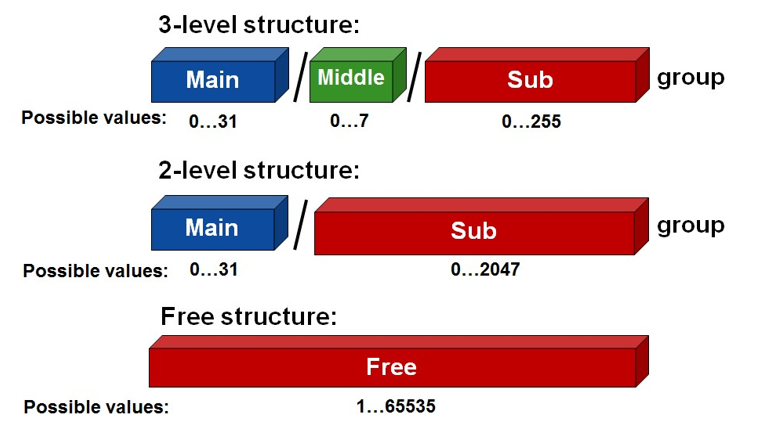
KNX Group Addresses use a three-level hierarchy: Main / Middle / Sub. A total of 32 main groups (0–31) are available.
The recommended approach is to organize by function and floor/zone, not by physical layout.
| Level | Recommended Mapping | Example |
|---|---|---|
| Main | Floor / Zone | 1 = Ground Floor |
| Middle | Function | 1 = Lighting |
| Sub | Room / Channel | 1 = Living Room Main Light |
Example from KNX Support:
1/1/1— Ground Floor / Lighting / Living Room Main Light1/2/3— Ground Floor / HVAC / Master Bedroom Thermostat Mode2/1/5— First Floor / Lighting / Child Room Spotlights
Why function-first? Because when you troubleshoot, you ask functional questions: “Why isn’t the lighting working?” not “Why isn’t the third device in the second row working?”
Important ETS consideration: Since ETS 6.3.0, the free-level Group Address structure is deprecated for new projects. New projects should use 2-level or 3-level structures.
Recommended Naming Convention
Use a consistent pattern for every Group Address description:
Pattern: [Function] - [Location] - [Action]
| Address | Description |
|---|---|
| 1/0/1 | Lighting – Reception – Switch |
| 1/0/2 | Lighting – Reception – Dim |
| 1/0/3 | Lighting – Reception – Status |
| 2/1/1 | HVAC – Floor 1 Meeting Room – Setpoint |
| 2/1/2 | HVAC – Floor 1 Meeting Room – Actual Temp |
This pattern makes the address self-documenting. Anyone reading the list understands the function without consulting a separate document.
Separate command from feedback: For every lighting circuit, use distinct addresses for command and feedback:
| Function | Example |
|---|---|
| Switch command | GF_Living_L01_CMD |
| Switch feedback | GF_Living_L01_FB |
| Dimming command | GF_Living_L01_DIM |
| Brightness value | GF_Living_L01_VAL |
| Brightness feedback | GF_Living_L01_VAL_FB |
This prevents telegram loops, false states, and visualisation errors.
Avoid ambiguous names: Do not use names like “Light 1”, “Channel 4”, or “Object 12”. Instead, include enough information to identify the function.
Function Groups — A Starting Template
| Main Group | Function |
|---|---|
| 0 | Lighting |
| 1 | Dimming |
| 2 | Blinds / Shutters |
| 3 | HVAC |
| 4 | Scenes |
| 5 | Central Functions |
| 6 | Feedback / Status |
| 7 | Reserved / Future |
Reserve groups 6 and 7. You will need them. Every project grows.
Central group addresses are typically assigned to main group 0, 14, or 15. Address 0/0/0 is reserved as a broadcast message for all elements of the KNX installation and cannot be assigned.
Plan for expansion: Do not use every available address immediately. Reserve logical space for future rooms, additional lighting circuits, HVAC expansion, new scenes, and energy monitoring.
The Documentation File
The naming convention is only half the work. The other half is the file that records it.
Minimum contents:
- Full Group Address list — every address, with description
- Device list — every physical device, with its addresses
- Line/Area structure — how the topology maps to the addressing
- Revision history — who changed what, and when
Use the Description field: ETS provides a Description field for Group Address elements. For example:
Name:
GF_Living_L01_CMD
Description: Living room ceiling lighting circuit 01. Command from wall keypad and automation logic. DPT 1.001 switching.
This becomes particularly useful during project handover.
Five Rules to Follow
- Name every address before commissioning. Not after. Before.
- Never use a raw number as a description. “1/2/3” tells no one anything.
- Reserve space between groups. Leave gaps for future additions.
- Document the same day you program. Retroactive documentation never happens.
- Hand over the file with the project. It is part of the deliverable, not a bonus.
Why This Matters for Migration
If you plan to bridge KNX to Matter, BACnet, or any future protocol, the gateway maps Group Addresses to the target data model. A clean, well-named structure makes this mapping straightforward. A chaotic structure makes it a manual, error-prone project.
The migration cost is determined years before the migration happens — at the moment you name the first Group Address.
Action Step
Open one of your active projects. Look at the Group Address list. Can a new engineer understand it without help?
If the answer is no, start the documentation file today. Even incomplete, it is better than nothing. And it will save you — or your successor — two days of debugging later.
📚 Sources
- KNX Hub — Practical guide to KNX Group Address design, naming conventions, and documentation.
- KNX Support — Group Address ranges and structure.
- KNX Support — ETS Group Address panel properties.
- KNX Association — KNX Standard (ISO/IEC 14543-3).